
What It Does
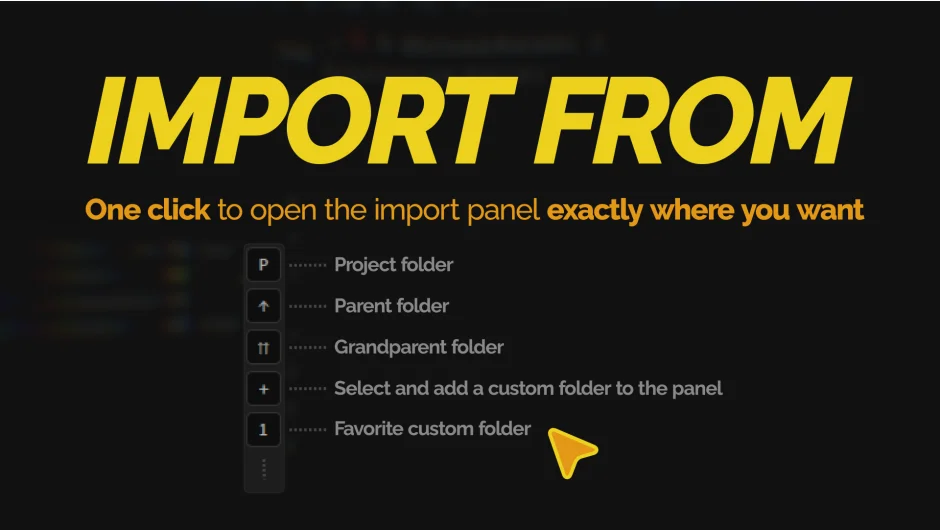
Import From is a ScriptUI panel for After Effects that skips the folder-browsing step when importing assets. Instead of navigating through directories every time you hit Ctrl+I, the panel opens the native import dialog pointed directly at your project folder, its parent, its grandparent, or any custom folder you’ve saved as a favorite.
The panel itself is 30px wide, so it docks in your workspace without taking up meaningful space.
Key Features
Relative path buttons. Three dedicated buttons let you import from the folder containing your .aep file, its parent directory, or the grandparent. If your project moves, the paths update automatically since they’re relative to the saved .aep location.
Custom favorites. Add any folder as a numbered favorite. Click the corresponding button to open the import dialog there instantly. Favorites persist across sessions via After Effects preferences.
Alt/Option+Click to open in Finder or Explorer. Every button doubles as a folder-opener. Hold Alt (Windows) or Option (macOS) while clicking to browse that directory in your OS file manager instead of triggering the import dialog.
Tooltip path preview. Hovering over any button shows a tooltip with the actual resolved path, so you can confirm where it points before clicking.
Who It’s For
Anyone working with structured project folders will get the most out of this. If your assets live in predictable locations relative to your .aep file, like a Footage/ folder one level up, the relative path buttons eliminate repetitive navigation. It’s also handy on large projects where favorites give you quick access to shared asset libraries or client-provided folders.
Note: the relative path buttons require the project to be saved first. Unsaved projects have no path reference, so those buttons won’t work until you hit Ctrl+S.
Pricing
Import From is a one-time purchase, currently on sale. A free trial is available through the aescripts + aeplugins manager by selecting “Add Trial” from the Account menu.