
What It Does
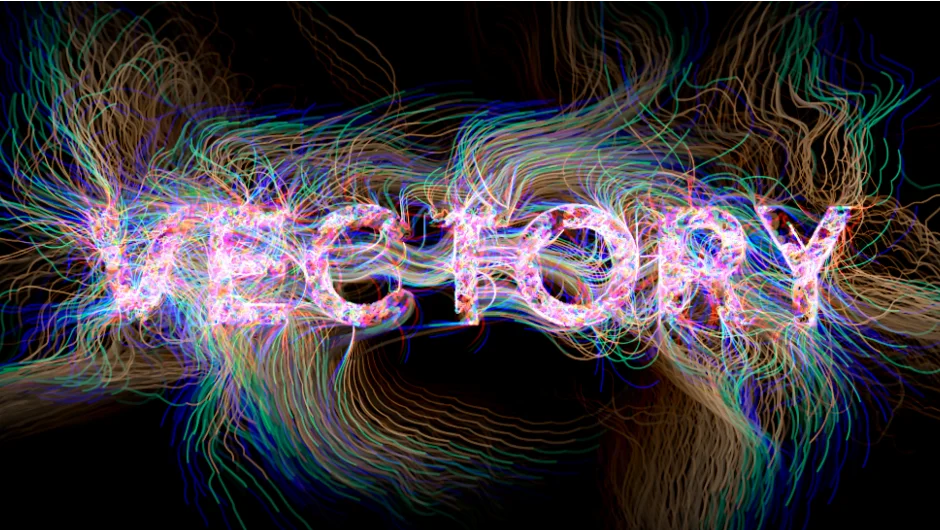
Vectory scans the brightness values in your source image and spawns thousands of particles that move across the canvas. Each particle reads the brightness at its current position and adjusts direction accordingly, building complex trails that reconstruct your image in an organic, evolving pattern.
The plugin renders these movements in three distinct modes: raw particles, static vectorized lines, or animated trails that fade over time.
Key Features
Three rendering modes. Particles mode shows the agents as moving points. Static Trails mode draws complete paths as still lines, creating a vectorized sketch effect. Trails mode produces flowing animation with fading streaks.
Brightness-based movement. Every step a particle takes depends on the pixel brightness beneath it. Lighter pixels might push particles one direction while darker areas guide them elsewhere. This creates organic reconstructions that follow the tonal structure of your source material.
Gravity Points. Place attraction or repulsion forces anywhere in the frame. Pull particles toward specific areas or push them away to shape the overall flow, shifting between delicate textures and explosive bursts.
Color remapping. Keep original image colors, shift them globally, or animate color transitions over the particle lifetime. Works well for stylistic variations without redoing the particle simulation.
Movement controls. Adjust spawn rate, particle count, lifetime, size variation, directional bias, and fluctuation levels. Brightness cutoff determines where particles can appear on the source image.
Works alongside other Zaebects tools like Modulation 2, JPEG Glitch, and Signal for experimental effects.
Who It’s For
Motion designers building abstract backgrounds, kinetic textures, or organic transitions. Useful for title sequences, music videos, or any project where you want pixel data to drive visual movement rather than handcrafted animation.
Pricing
Pay what you want. Set your own price when purchasing. The developer suggests $59.99, but you control the amount.