
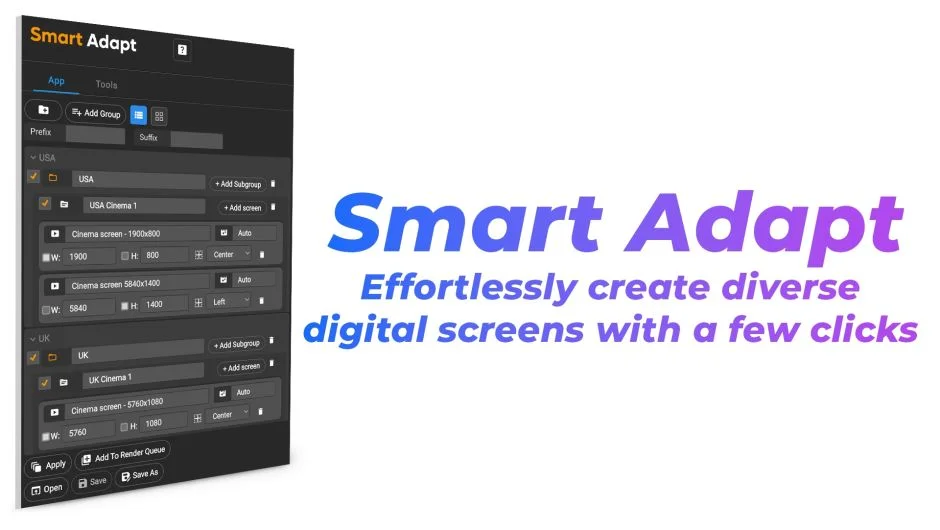
What It Does
Smart Adapt generates hundreds of composition versions from a single master file. Tag specific layers to different screen sizes, set alignment rules, and switch between all your versions with one click. Built for editors managing deliverables across social platforms, mobile devices, and web formats.
Key Features
Group and subgroup organization. Create unlimited screens, organize them into groups, and check boxes to include or exclude specific versions from adaptation runs.
Dimension presets. Save common sizes (1080x1080, 9:16 vertical, 16:9 horizontal) and apply them instantly. Create, rename, or delete presets as your needs change.
Auto duplicate screens. The extension finds the closest resolution from your master folder and automatically duplicates, renames, and adapts it. Or assign a specific composition manually as the master for a particular size.
List export and import. Build a screen list once, export it, and reuse it across projects. Save, re-open, and duplicate lists with Save As. The Unload button lets you switch between lists without restarting the extension.
Tools tab. Batch-update composition settings like frame rate or duration. Replace transitions automatically using markers. Adjust anchor points (top, bottom, center). Apply quick expressions like Fit to Comp, Center Position, or Auto Frame (a responsive border that scales with comp size). Add nulls for grouped control and “Parent All” to scale entire compositions.
Thumbnail view. See your screen list as thumbnails alongside the traditional list view, making it easier to recognize compositions visually.
Who It’s For
Useful if you deliver the same animation in multiple aspect ratios: social media templates (square, vertical, landscape), client versions with language variations, or web banners in a dozen sizes. Instead of duplicating and manually resizing, you define the screens once and let Smart Adapt handle the rest.
Pricing
Smart Adapt is subscription-based at $39/month (recurring monthly plan). An annual option is available that saves two months of cost. A free trial is available to test the workflow before subscribing.