
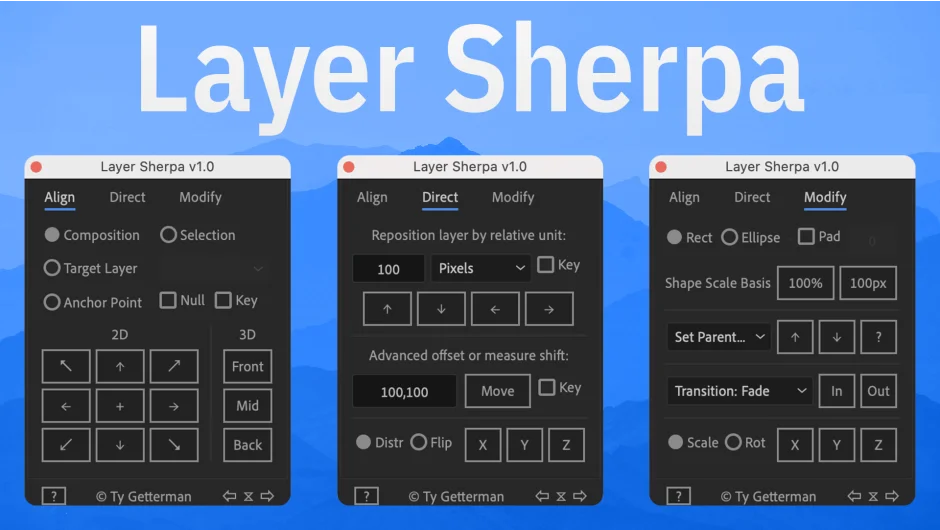
What It Does
Layer Sherpa replaces After Effects’ built-in Align panel with a tabbed interface that adds dozens of layer management functions. Beyond basic alignment, it handles guide creation, anchor point positioning, timeline navigation, advanced repositioning with math variables, and batch operations like staggering or creating shape mattes.
Key Features
Alignment tools. Align layers to composition, selection, or target layer in 2D/3D. Works inside bounds, outside bounds, or along constrained axes. Position anchor points relative to layer or selection.
Guides system. Place guides centered, divided, or offset to composition, selection, or target layers.
Hotkey-enhanced interface. Tabbed UI with keyboard shortcuts for frequent operations like repositioning by 1px, 10px, or 100px.
Advanced repositioning. Reposition layers using pixel values, percentages of layer size, or percentages of comp size. Supports math operators (+, -, *, /, parentheses) and variables like lw (layer width), cw (comp width), sh (selection height).
Timeline navigation. Increment/decrement by 1 frame, 10 frames, 1 second, or jump to timeline start/end or layer In points. Save and restore exact playhead positions.
Distribution and flipping. Distribute layers evenly along X/Y/Z axes. Flip layer order or mirror layer positions mathematically without flipping content.
Shape and matte creation. Generate rectangles or ellipses (including rounded rectangles) as shapes or track mattes. Define size based on layer, selection, or custom padding with variable support.
Parent null creation. Parent selected layers to nulls positioned at user-chosen locations relative to composition or selection.
Batch operations. Match in/out points between layers, set layer duration, shift layers, stagger layers in ascending or descending order (by frame or end-to-end), invert layer order.
One-click transitions. Add fade in/out or scale in/out transitions to or from layer start/end or playhead position.
Scale and rotate presets. Increment/decrement scale (proportional or per-axis) by 1% or 10%, or match size from layer name. Rotate on X/Y/Z axes by 1° or 10°. Reset to defaults.
Measure position shift. Calculate position changes between two keyframes (supports separate dimensions).
Match dimensions. Resize layers to fit, fill, or equal another layer’s dimensions.
Who It’s For
Useful for motion designers working with multi-layer compositions where repeated alignment, distribution, or repositioning operations slow down workflow. The math variable system suits technical animators who need precise relative positioning. Shape/matte creation helps with design tasks that don’t require dedicated shape tools.
Pricing
Single-user license is $40. A trial version is available to test functionality before purchase.
Special offer: Buy before the author releases PS Layers ($20) and Switchboard ($20), and receive a free license to one of those scripts.
Compatible with After Effects 2024, 2023, 2022, and 2021.
