
What It Does
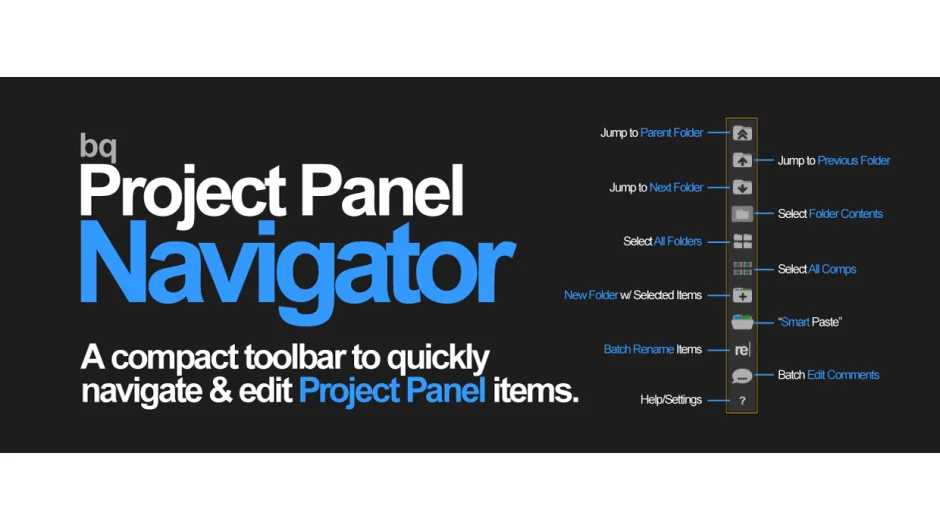
bq_Project Panel Navigator adds a compact toolbar to After Effects that simplifies working with items in your Project Panel. Instead of clicking through folders and right-clicking to rename items one by one, you get quick access to navigation shortcuts, batch renaming, and folder organization tools.
The plugin is pay-what-you-want (suggested minimum $9.99), which makes it accessible for individual users who need basic project organization without spending much. Businesses and teams are expected to pay the suggested price.
Key Features
Most functions support modifier keys (Shift, Alt) for variations, letting you control the scope of your actions without switching tools.
Jump to Parent Folder. Click to move up one folder level. Shift+Click jumps to the first item in your project, and Shift+Click again from the top jumps to the last item.
Jump to Previous/Next Folder. Navigate between folders at the same level with a click. Hold Shift to jump to any folder regardless of hierarchy.
Select Folder Contents. Click to select everything inside the currently selected folder. Shift+Click also selects items in subfolders. Alt+Click deselects everything in the Project Panel.
Select All Folders or All Comps. One click selects all folders at your current level. Shift+Click targets the root level, and Shift+Alt+Click selects project-wide. The same pattern works for compositions.
New Folder with Selected Items. Creates a new folder and automatically moves your selected items into it, saving several clicks when reorganizing.
Smart Paste. Paste copied items to the selected folder or current level. Shift+Click forces paste to the current level even if a folder is selected. Alt+Click removes the number After Effects appends to duplicate names (e.g., “Comp 2” becomes “Comp”). Be careful with this option if your item names already end in numbers.
Batch Rename Items. Launch a utility to search and replace text across multiple selected items, or add a prefix/suffix. Useful when you need to update naming conventions across a project.
Batch Edit Comments. Edit comments for all selected items at once. Shift+Click lets you edit each item’s comment in succession, one by one.
Customizable Toolbar. Toggle button size with Shift+Click on the Help/Settings icon. The panel automatically switches orientation (row or column) based on its size, so it adapts to wherever you dock it.
Who It’s For
This plugin suits editors and motion designers who work with large projects containing many folders and compositions. If you regularly reorganize assets, rename layers, or jump between nested folders, the toolbar saves time. The keyboard shortcut alternatives (Alt+Click, Shift+Click) are faster once you learn them.
Version 1.5 fixed an issue where preferences didn’t save between sessions and improved processing speed. The plugin works on After Effects CC 2017 back to CS5.
Pricing
bq_Project Panel Navigator uses a pay-what-you-want model with a suggested minimum of $9.99. Individual users can pay any amount, but businesses and teams must pay the suggested price to receive a valid license. Once purchased, you own it outright (no subscription).
