
What It Does
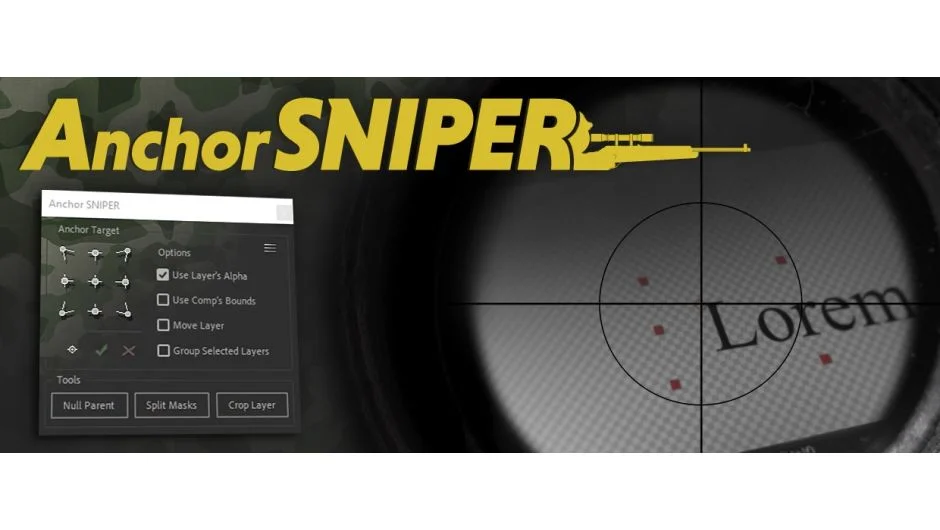
Anchor SNIPER gives you precise control over anchor point placement in After Effects. It detects the actual visible edges of your layers, including transparency from masks and effects, then moves anchor points to exact positions with a single click. Select one or more layers, choose from over 20 placement combinations, and the plugin handles the rest without disrupting existing keyframes.
Key Features
Alpha-channel scanning. The plugin’s detection algorithm reads your layer’s true transparency boundaries, accounting for masks, effects, and alpha channels. When you position an anchor point to an edge, it finds the real edge, not the bounding box.
Multi-layer support. Select multiple layers and process them individually or as a group. Each layer’s anchor point moves relative to its own content, and existing animations stay intact.
Nine fixed targets plus custom placement. Click any of the nine grid positions (corners, edges, center) to snap anchor points instantly. Or use the custom target option to position anchor points anywhere with the move tool.
Null Parent Mode. Instead of moving the anchor point, this creates a null layer at your target location and parents your layer to it. Useful for complex rigging setups where you need independent control.
Split Layer’s Masks. Takes a layer with multiple masks and separates it into individual layers, one per mask. Saves time when you need to animate masked sections independently.
Crop Layer. Pre-composes your layer and automatically crops the composition to the visible pixels. Trims excess transparent space based on the same alpha detection used for anchor points.
All layer types work: bitmap images, vectors, text, shapes, video, and 3D layers. The interface includes a compact mode to hide the tools section when you don’t need it.
Who It’s For
Motion designers who rig characters or build complex animation systems will find the null parent mode particularly useful. The alpha detection makes it valuable for anyone working with imported graphics that have irregular shapes or transparency. If you regularly reposition anchor points for rotation or scale animations, this eliminates the manual work of finding exact pixel coordinates.
Pricing
One-time purchase at $14.99. A free trial is available to test the plugin before buying.