
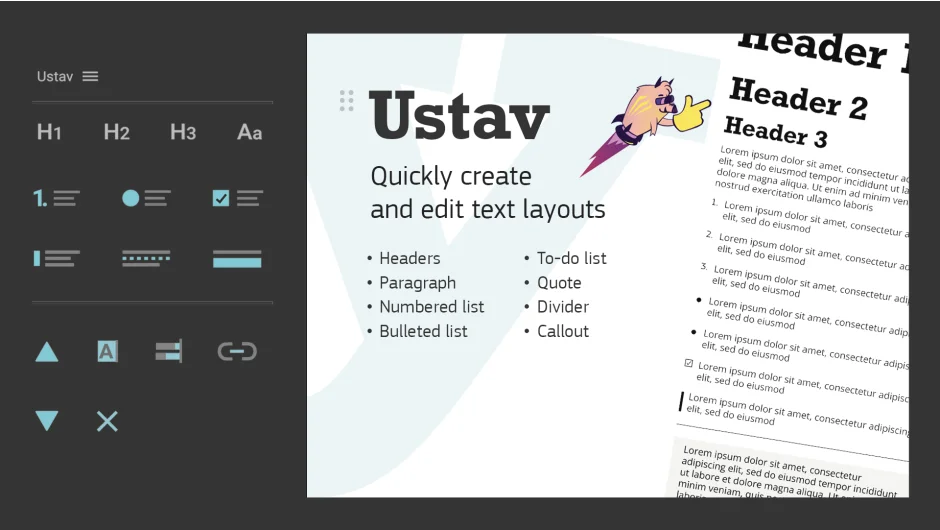
What It Does
Ustav builds text layouts in After Effects using expression-driven blocks that respond to changes made through a central control layer. You create headers, paragraphs, lists, quotes, and other text elements through a panel, and all formatting (size, spacing, color, bullets) gets controlled from one pseudo-effect on the layout layer.
The plugin uses masks that scale with your text, keeping elements aligned and properly sized as you edit. When you change the width of the layout or adjust leading and tracking, every block updates automatically.
Key Features
Eight block types. Headers come in three scalable sizes. Paragraphs are plain text blocks. Numbered lists update their numbering automatically when you add blocks, and you can set custom starting numbers. Bulleted lists offer seven bullet styles plus custom options. To-do lists include checkbox elements with checked/unchecked states and marker-triggered animations. Quotes place a responsive vertical line alongside text. Dividers separate sections. Callouts wrap text in a responsive rectangular box.
Centralized settings layer. When you create your first block, Ustav adds a layout layer containing a pseudo-effect with all formatting controls. Text sizing, leading, tracking, spacing, colors, and block-specific settings (bullet types, checkbox states, quote line appearance) all live here. Change one setting and every associated block updates.
Selection tool. Filter and select text layers by type (all headers, all paragraphs, or all text layers in the layout). Useful when you need to apply effects or change fonts across multiple blocks at once.
Expression cleanup. The “Remove Layout Expressions” button converts expression-driven properties to keyframes, making the layout static but freeing it from the control layer. Helpful if you need to share a project or want to manually animate individual blocks.
Who It’s For
Ustav works well for presentations, title sequences, infographics, and any project where you’re working with structured text layouts. If you’re building educational videos, conference slides, or data-driven animations with consistent formatting, the centralized control saves time over manually formatting each text layer.
The responsive blocks help when clients request layout changes after you’ve already built animations. Adjust the width or spacing once rather than repositioning dozens of layers.
Pricing
Pay-what-you-want pricing for individual users. The suggested price is $29, though you can pay less if you’re a student or experimenting. Teams and commercial entities should pay the suggested amount for a legal license. Trial version available.