
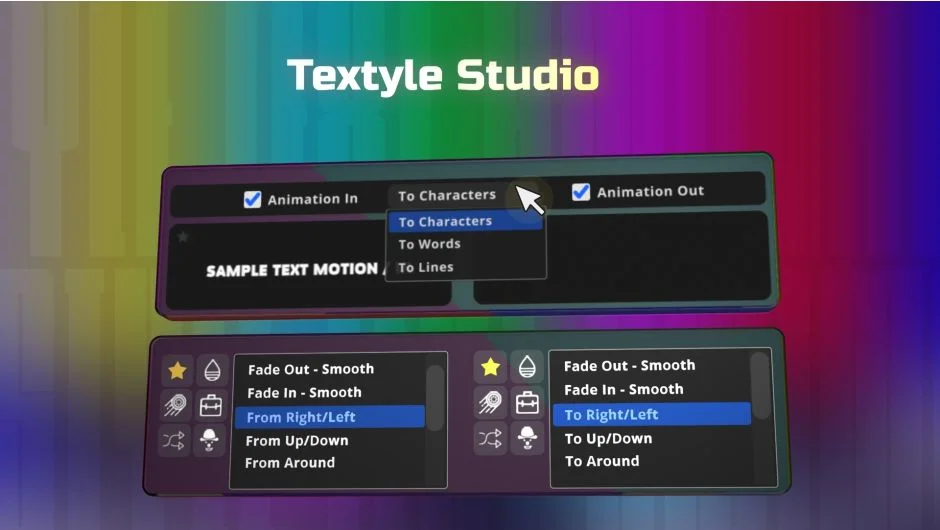
What It Does
Textyle Studio provides a preset-based approach to text animation in After Effects. Instead of keyframing animations from scratch, you select from over 550 title animations organized into 8 categories. The plugin also includes 30+ text styles across 4 categories, letting you combine motion with visual treatments.
Key Features
550+ title animations. The animation library spans 8 categories and receives free updates. Each animation is fully adjustable through the plugin’s settings panel.
Separate in and out animations. Control how text enters and exits independently. You can set different animations for each and adjust their duration using markers or the timeline.
30+ text styles. Apply visual treatments like outlines, glows, or gradients from 4 style categories. These work alongside animations and can be toggled on or off in settings.
Font style text creation. Added in version 1.4, this feature lets you create text layers with specific font styling directly from the plugin interface.
Who It’s For
Useful for motion designers who produce title sequences, social media videos, or any project requiring consistent text animations. The preset approach works well when you need repeatable results across multiple text layers or when working under tight deadlines.
Pricing
Textyle Studio uses pay-what-you-want pricing. You can set your own price when purchasing directly from aescripts.com. The developer receives updates free of charge, so you pay once and get new animations and styles as they’re released.
Alternatively, it’s available through Plugin Play subscriptions at $20.83/month (billed yearly) or $30 as a one-time purchase through that platform.