
What It Does
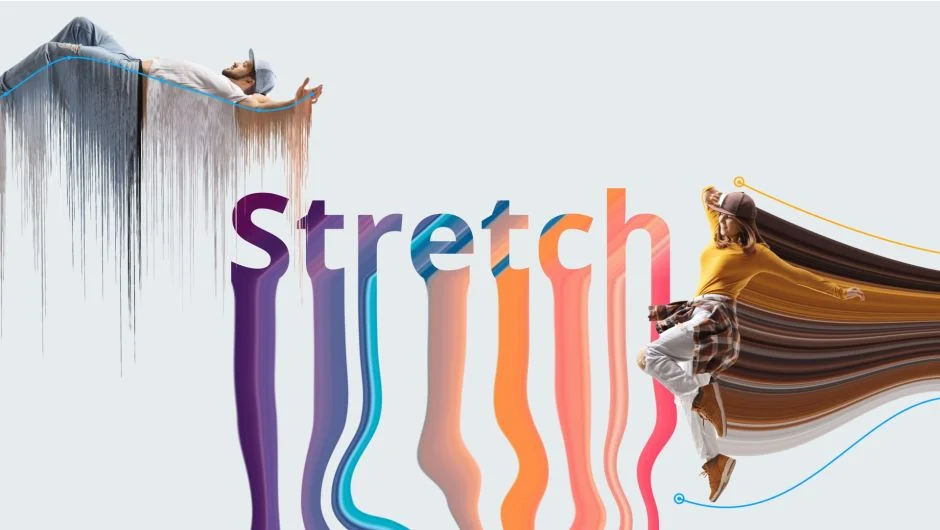
Stretch distorts pixels along or across two mask paths. Draw two masks on your footage or text layer, apply the effect, and pixels stretch along the curved paths you define. The plugin works with both images and video, warping them along mask shapes in real time.
Key Features
Stretch direction. Choose to stretch pixels along the path between two masks or across perpendicular to them. Both modes let you create curved distortions that follow your mask shapes.
Stretch Ramp. Control how strongly pixels stretch at different points along the path. The ramp lets you fade the effect or concentrate it in specific areas.
Distortion controls. Add noise-based distortion along the stretched pixels. Animate the distortion using Noise Offset for flowing, organic movement. The effect includes both noise and ramp controls for precise distortion shaping.
Strips randomization. Break the stretch into strips and randomize them for added detail and texture variation. Adjust the random factor to control how much variation appears.
Opacity ramps. Fade stretched pixels using opacity controls that work both along and across the stretch direction. Useful for creating gradient transitions or fading effects at the edges.
Loop animation. Add seamless looping motion to the stretched pixels with one setting. The effect flows continuously without visible seams.
Wireframe preview. Display the underlying mesh structure to see exactly how pixels will deform. Adjust the base mesh point count to refine the distortion quality.
Who It’s For
Useful for motion graphics work requiring stylized distortions, like logo reveals, text treatments, or abstract visual effects. The mask-based workflow suits projects where you need precise control over distortion paths. Also works for creating texture flows, displacement effects, and animated backgrounds.
Pricing
Single User License: $49.00 (one-time purchase). Includes a trial version to test before buying.