
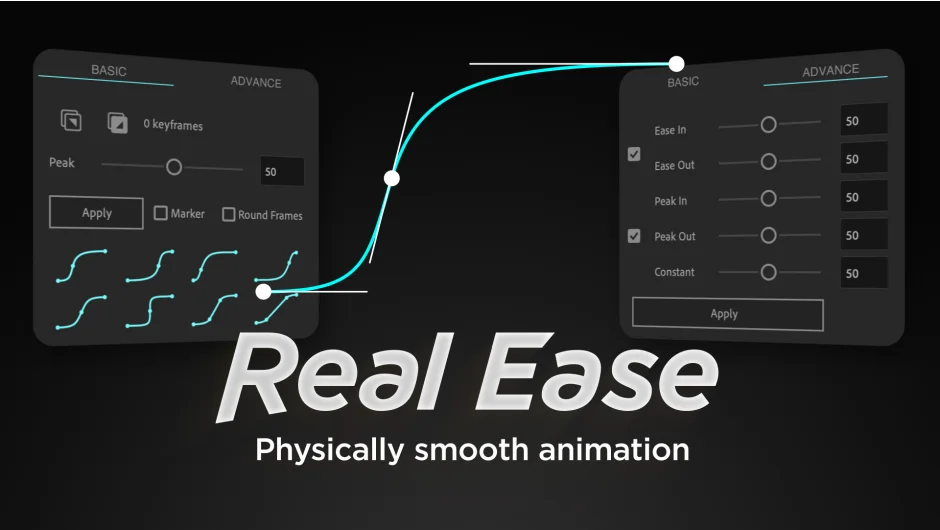
What It Does
Real Ease generates smooth, realistic motion between two keyframes by automatically adding an intermediate keyframe. Select two keyframes, click Apply, and the plugin calculates the timing for peak speed and adjusts bezier handles to create physically accurate acceleration and deceleration. This replicates the kind of smooth motion you’d get from physics-based animation in 3D software.
Key Features
Peak control. Adjust how long the animation stays near top speed. Higher values extend the time spent at maximum velocity, lower values create sharper transitions.
Constant velocity mode. Set a sliding motion with sustained speed that can be interrupted mid-animation. The plugin focuses on acceleration and deceleration forces, making it useful for objects that need to move realistically, like a sliding car or camera move.
Ease in/out presets. Apply quick presets for common easing curves without manually placing extra keyframes. Eight presets cover standard motion scenarios, from gentle eases to aggressive snaps.
Copy and paste animation curves. Transfer easing between properties. Works with 1D, 2D, and 3D properties and supports three or more keyframes.
Add markers. Automatically places markers at peak speed and constant velocity times for reference.
Round frames. Snaps keyframe timing to integer frame values for cleaner timelines.
Who It’s For
Useful for motion designers who need realistic timing without manually tweaking three keyframes to match. Works well for product animations, logo reveals, camera moves, or any scenario where you want the motion to feel weighted and physically plausible.
Pricing
Single purchase at $20.00 (regular $24.80). Special pricing valid until March 15, 2026. No subscription. Floating Server License available at the same price for multi-seat studios.