
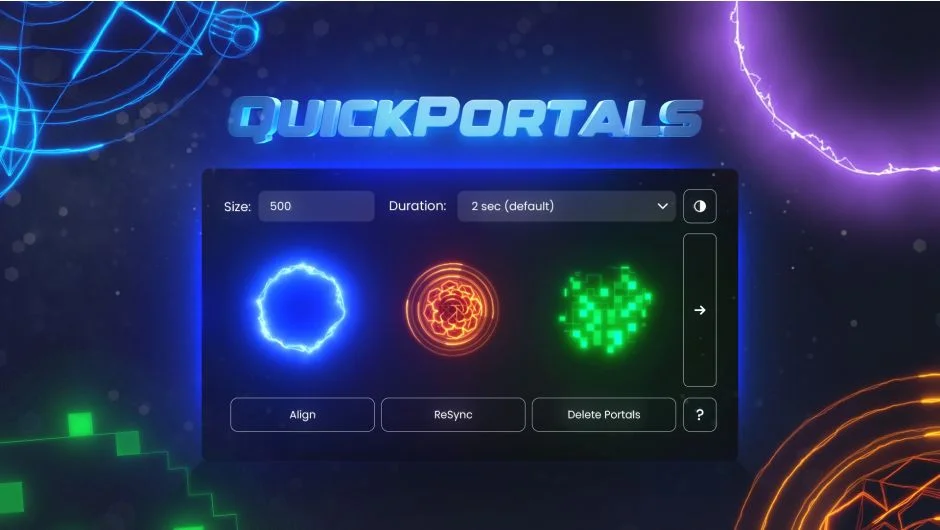
What It Does
QuickPortals generates portal transition effects for After Effects footage by combining the built-in 3D Camera Tracker with pre-built templates. Track your shot, create a camera, select a portal style, and the plugin handles the rest. The result is a transition where your video appears to pass through a dimensional portal.
Key Features
Three portal styles. Choose from NEON (glowing edges), SIGIL (mystical symbols), or PIXEL (digital breakdown). Each style includes multiple preset variations.
3D camera integration. The plugin works with After Effects’ native 3D Camera Tracker. Track your footage, create a camera from the tracking data, then let QuickPortals build the transition around that camera movement.
Template-based workflow. Select a duration from the dropdown menu and click a style icon. The plugin loads a pre-configured After Effects template with the portal already set up. Manual adjustments are straightforward: use the “ALIGN / REPLACE Video” option to center your footage, guided by Title/Action Safe overlays.
Full customization. Open the “STYLE” composition to tweak every aspect of the portal appearance. Color, intensity, animation timing, all the layers and effects are accessible for editing.
Who It’s For
Useful for editors working on sci-fi content, music videos, or any project where a stylized dimensional transition fits the creative direction. If you’re comfortable with basic 3D tracking in After Effects, the learning curve is minimal.
Pricing
Single purchase at $25 (currently on sale from the regular $30). One-time payment, no subscription. Compatible with After Effects 2025 and 2024.