
What It Does
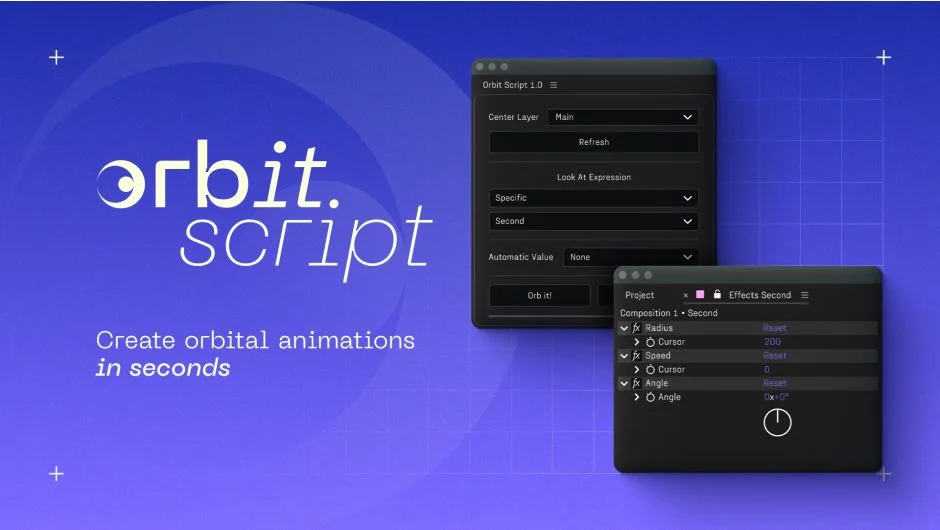
Orbit Script adds orbital motion to any layer in After Effects. Select a pivot layer, choose which layers should orbit around it, and the script generates expressions and controls automatically. Each orbiting layer gets three adjustable parameters: Radius (distance from center), Speed (angular velocity), and Angle (starting offset).
The setup is non-destructive. Canceling the orbit removes all expressions and controls in one step.
Key Features
Center Layer selection. Pick any layer in your comp as the pivot point. Apply orbital motion to one or multiple layers at once.
One-click control setup. The script adds three slider controls per layer and writes a clean position expression. No manual expression editing required.
Auto Radius option. Set to Inside or Outside, and the script calculates radius automatically based on ellipse shapes or circle-like rounded rectangles. This prevents overlapping elements when orbiting around shape layers.
Keyframe-ready. All three controls (Radius, Speed, Angle) can be keyframed like any other property. Animate orbits that grow, slow down, or change phase over time.
Who It’s For
Useful for motion graphics work where you need circular layouts or planetary-style animations. Logo reveals, loading indicators, infographic elements that rotate around a center point all become faster to build. If you’re hand-keyframing circular motion or writing orbit expressions from scratch, this script turns that into a single button press.
Pricing
The script costs $9.99 for a single user license. A floating server license is available for multi-seat studios. A free trial can be installed through the aescripts + aeplugins manager.