
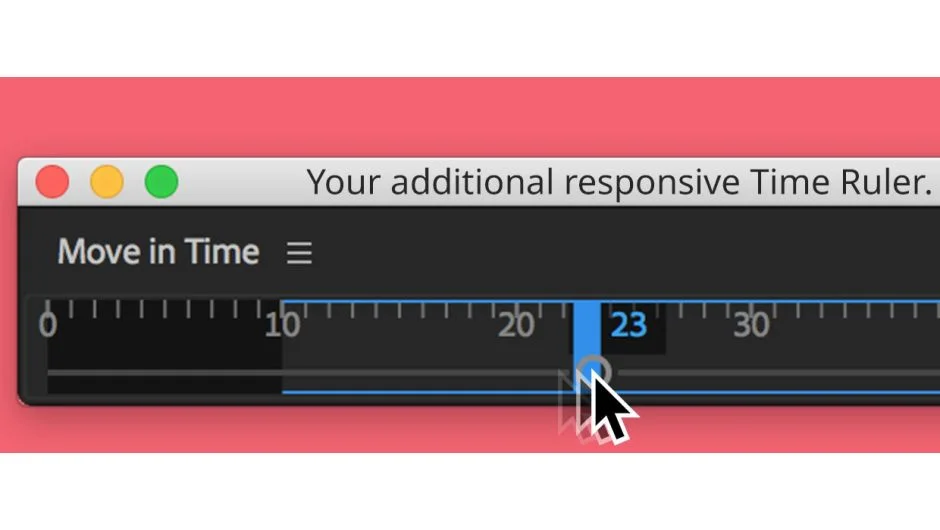
What It Does
Move in Time adds a visual time ruler palette to After Effects that mirrors your timeline but gives you more screen real estate and navigation options. Click to jump to specific frames, use keyboard shortcuts for precise movement, or scrub through your composition with live preview feedback. The palette adapts its display to wherever you dock it, showing the full composition range plus work area indicators.
Key Features
Keyboard navigation. Left/Right moves 1 frame, add Shift for 10 frames, add Alt for 1 second. Up/Down jumps to composition start/end, or work area boundaries with Shift. Enter launches the Go to Time dialog.
Two scrubbing modes. Drag the slider circle to see animated bounding boxes of selected layers. Hold Ctrl/Cmd while moving your cursor sideways (without clicking) for live preview updates as fast as your system can process.
Dockable palette. Works best as a ScriptUI palette where it preserves native After Effects shortcuts. When you hover over it, the palette claims focus for directional keys, but click away and other shortcuts like j/k for keyframe navigation still work normally.
Visual feedback. The palette automatically adapts its display size to where you dock it, showing your full composition timeline with work area marked. Useful if your main timeline feels cramped or you’re working on a second monitor.
Who It’s For
Editors who need precise frame control and prefer visual navigation over scrubbing the native timeline. The keyboard shortcuts overlap with After Effects’ built-in commands but add the 1-second jump option. If you frequently work with longer compositions or need timeline navigation on a secondary display, this provides a cleaner dedicated interface.
Pricing
This plugin has been discontinued and is no longer available for purchase. It previously operated on a pay-what-you-want model.
Note: After Effects version 16.1.2 (June 2019) had a bug causing vector graphics to flicker in the ScriptUI interface. Functionality wasn’t affected, and the issue was resolved in After Effects 2020 (version 17.0).