
What It Does
MochaImport+ connects mocha’s planar tracking to After Effects without the usual friction. It reads tracking data directly from mocha (including the bundled plugin version) and turns it into stabilized precomps, corner pins, or expression-driven animation. This matters when you need to paint out objects, retouch footage, or move masks along a tracked surface.
Key Features
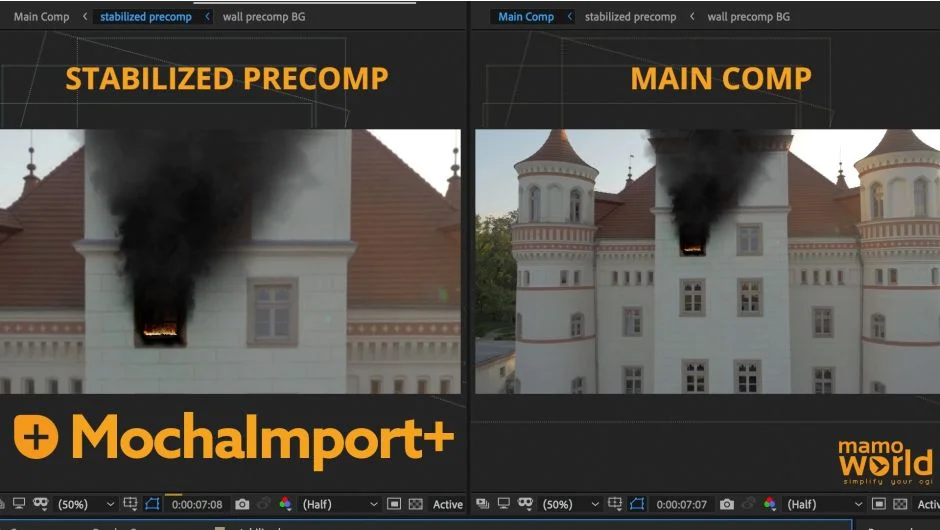
Stabilized precomps. These let you work on moving footage as if it were a still image. Track a region in mocha, create the precomp, then paint, clone, or composite inside it. Your edits automatically transfer back to the original perspective. Useful for removing logos, fixing blemishes, or inserting objects that need to stick to a surface.
Expression-driven tracking data. Instead of hundreds of keyframes, your tracking becomes a single expression. Adjust one keyframe and the entire track shifts. When a corner pin drifts a few pixels off target, you tweak it once rather than hunting through the timeline. You can also keyframe on top of the expression to fix inaccurate sections while keeping the rest intact.
Move masks and properties. Apply mocha tracks to After Effects masks or any 2D property (position, effect points). The plugin accounts for shear and perspective, not just position and rotation. Rotoscope in mocha, import the mask, then fine-tune it in After Effects with manual keyframes blending into the tracked movement.
Stabilize and smooth. Control stabilization strength for projects like hyperlapses where you want motion smoothed but not locked. The stabilize rig gives you granular control over how much movement gets removed.
Support for third-party corner pins. Works with CC Power Pin, Bezier Warp, Red Giant’s Warp Corner Pin, and others. Bezier Warp is particularly useful for curved surfaces like bottles or flags where standard four-point pins fail.
KBar and scripting support. Trigger any MochaImport+ function from a KBar button or call it from your own ExtendScript. Build custom pipelines or automate repetitive tracking tasks.
Version 6 compatibility. Reads tracking data directly from the mocha plugin effect in CC 2019 and later, where older export methods no longer work. Also includes performance improvements like low-resolution stabilized precomps and automatic filtering of redundant keyframes.
Who It’s For
VFX artists doing screen replacements, beauty retouching, or object removal. Motion designers tracking text or graphics to moving surfaces. Anyone who finds After Effects’ built-in mocha workflow clunky or limited. If you regularly switch between mocha and After Effects, this eliminates most of the manual translation work.
Pricing
MochaImport+ uses a pay-what-you-want model with a suggested price of $49.99 for a full license. Upgrades from earlier versions cost $29.99, or free if you purchased after June 2018 (check your account for eligibility). There’s also a Tracking Bundle ($79.99) that includes MochaImport+, MaskTracker+, CopyMask2Layer, Tracker2Mask, and KeyTweak. Perpetual licenses, no subscriptions.