
What It Does
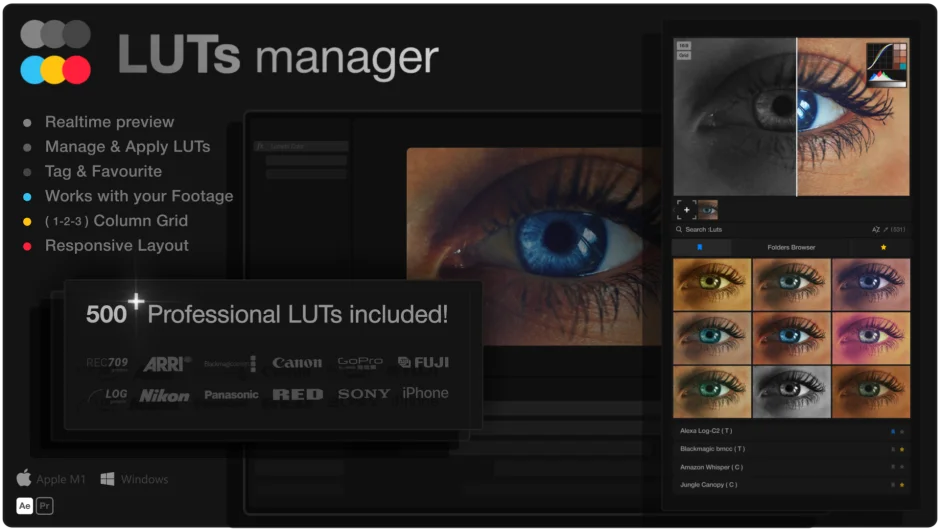
LUTs Manager centralizes your entire LUT library into a single interface where you can preview, organize, and apply color grades in real time. Instead of clicking through files one by one, you see all your LUTs applied to your footage simultaneously in a gallery grid. Works as both a standalone application and a CEP extension for Premiere Pro and After Effects.
Key Features
Real-time gallery preview. Import a frame from your timeline or load custom images, then see hundreds of LUTs applied to that footage instantly. Drag a slider to compare before and after, or shift-click to preview individual LUTs at full size.
Smart search and tagging. The search engine scans LUT names, folder names, and custom tags as you type. Tag your LUTs by project, style, or client, and the tool auto-generates tags from folder structures. Filter by favorites or most recently used.
One-click application. Right-click any LUT to apply it directly to selected layers in After Effects or clips in Premiere Pro. Copy file paths, reveal LUTs in Explorer/Finder, or manage them via context menu.
Handles massive libraries. Designed to work with millions of LUTs without performance slowdowns. Sort alphabetically or by recent use. Resize the panel to fit your workspace.
Who It’s For
Colorists and editors who work with large LUT collections and need faster ways to preview grades. Particularly useful if you’re matching looks across multiple projects or exploring creative options without applying effects one at a time.
Pricing
$79.99 for a one-time license. Includes the LUTs Manager tool plus a bundled pack of 500 professional LUTs organized into 85 categories (commercial, documentary, corporate, etc.), with five variations per style. All LUTs are Rec. 709 formatted and compatible with major editing software. Windows and Mac versions included.