
What It Does
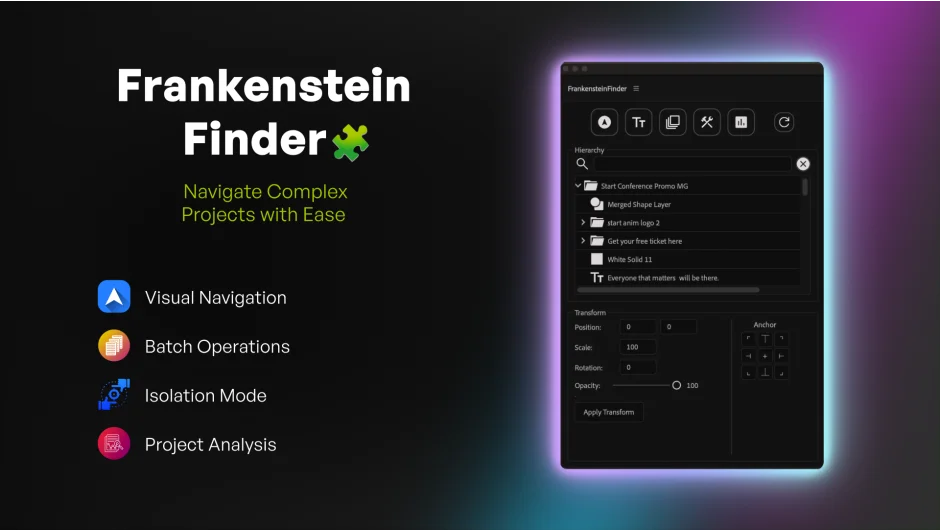
Frankenstein Finder gives you a searchable tree view of your entire After Effects project, showing every layer across all nested compositions in a single dockable panel. Double-click a layer five comps deep and jump straight to it. Built for motion designers managing 200+ layer projects, it replaces hours of timeline diving with instant navigation.
Key Features
Visual Layer Navigator. The searchable tree shows your entire project hierarchy with layer type icons (Text, Shape, Precomp, Solid, Null, Camera, Light). A live transform inspector displays Position, Scale, Rotation, and Opacity for selected layers. No more clicking through nested precomps to find that one text layer.
Batch Operations. Smart rename adds sequential numbering, prefixes, or suffixes to multiple layers at once. Copy transform properties (Position, Scale, Rotation, Opacity) from one layer to many. What takes 30 manual clicks now happens in one.
Isolate Mode. Hide everything except selected layers using shy settings without breaking your timeline structure. “Show All” restores your exact previous visibility state. Useful when you need to focus on a specific animation chain buried in a complex comp.
Text Editor. Edit text layer content remotely, even when it’s nested several comps deep, without navigating away from your current workspace.
Project Auditing. Scan for unused assets and clean up bloated projects. The analysis panel shows project health stats and helps you maintain organized files.
Who It’s For
Motion designers working with client revisions, multilayer title sequences, or template projects where layers reference layers that reference more layers. If you’ve ever lost 10 minutes hunting for a precomp, this is for you.
Pricing
$19 for a single-user license (one installation plus one archival copy). Compatible with After Effects CC 2020 or later on Mac and Windows. A trial version is available on the aescripts website.
