
What It Does
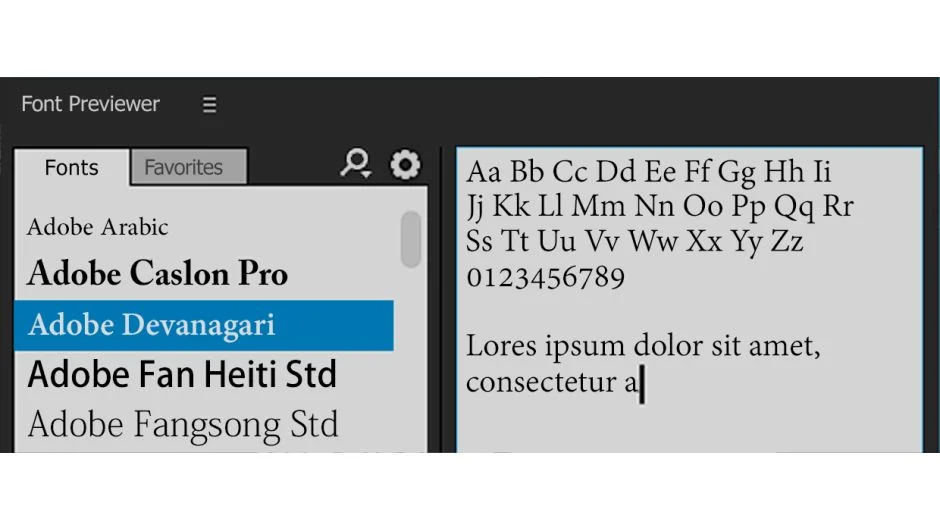
Font Previewer adds a dedicated panel to After Effects for browsing and applying system fonts. Instead of scrolling through the character panel, you get a visual font browser with preview controls, search, folder organization, and one-click application to text layers.
Key Features
Live font preview. Type custom sample text and see any installed font rendered with adjustable size, style, and tracking before applying it. Save and load frequently used sample text for faster testing.
Folder-based organization. Create custom folders to group fonts by project, style, or client. Add fonts to favorites for quick access. The plugin remembers your organization between sessions.
Keyword search. Filter the font list by typing part of a font name. Useful when working with large font libraries.
Three color themes. Choose dark, default, or light interface themes to match your workspace. Switch between wide and compact panel layouts depending on screen space.
Apply to selected layers. Click Apply to instantly update selected text layers with the previewed font settings (family, style, tracking). No need to navigate through multiple menus.
A future update will add font style presets, letting you save and recall complete typographic settings.
Who It’s For
Useful for motion designers working with multiple fonts per project, especially when coordinating brand guidelines or testing typographic options for title sequences. The folder system helps organize large font collections (corporate libraries, Google Fonts installs, etc.).
Pricing
This is a pay-what-you-want plugin. The developer lists it at $34.99 as a suggested price, but you can name your own amount when purchasing. A limited Font Previewer Lite version is also available for $14.99 with basic preview functionality.
Compatible with After Effects CS6 through 2025 on both Windows and macOS (including Apple Silicon).