
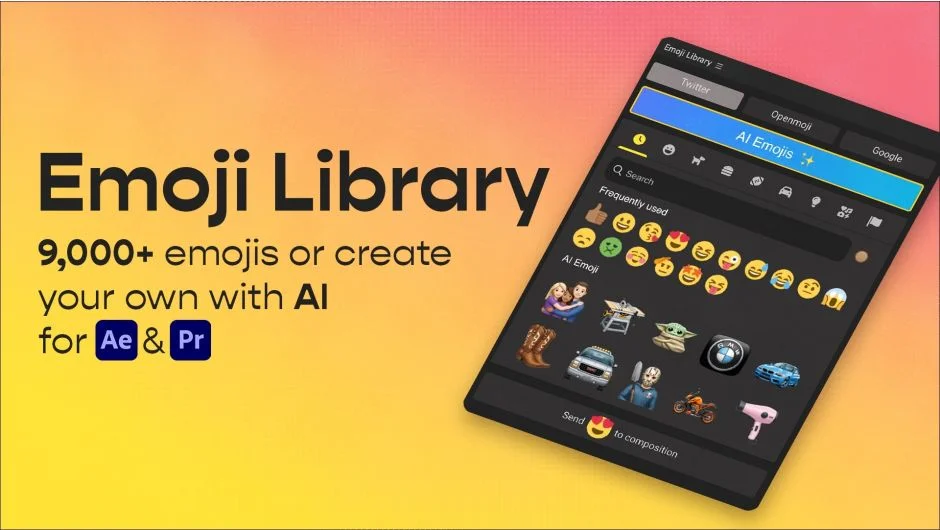
What It Does
Emoji Library provides instant access to over 9,000 official open-source emojis from Twitter (CC-BY 4.0), Openmoji, and Google Noto. Click once and the emoji downloads as a ~500x500px PNG file into your project’s /emoji directory. Works in both After Effects and Premiere Pro.
The plugin also generates custom emojis using AI. Type a text prompt (“baby Yoda,” “BMW logo,” “cowboy boot”) or upload an image reference to create emojis that don’t exist in standard libraries. Useful for branded content, inside jokes, or specific visual concepts.
Key Features
Search and filtering. Find emojis by keyword or browse by category. The interface shows visual thumbnails, so you’re not hunting through text lists.
Skin tone selection. Choose from six skin tone variants for emojis that support them.
AI generation. Generate emojis from text prompts or uploaded images. Downloaded emojis are saved locally as PNGs.
Expression-driven masks. Fine-tune and animate imported emojis using After Effects expressions. The plugin doesn’t lock you into static assets.
Who It’s For
Useful for social media editors working on short-form content, motion graphics designers building animated overlays, or anyone who needs quick access to emoji assets without leaving Adobe apps. The AI generation feature helps when you need something specific that standard emoji sets don’t cover.
Requires an internet connection to download emojis and access AI features.
Pricing
$9.99 for a single user license. Includes commercial rights for two instances (third login deactivates a previous session). Compatible with After Effects and Premiere Pro CC 2019 through 2026 on Windows 10+ and macOS. Trial version available.