
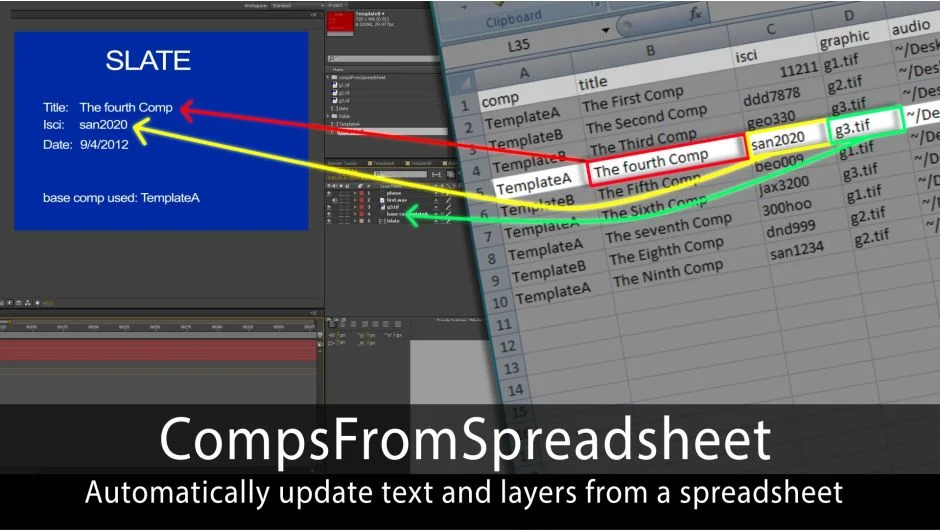
What It Does
CompsFromSpreadsheet automates creating multiple versions of a comp by reading data from a spreadsheet. Point it at a template comp and a spreadsheet, and it generates copies with updated text, swapped footage, or replaced layers. Used by NBC, HBO, and Disney for batch production work like personalized client videos, lower thirds, or slate generation.
The script reads a tab-delimited text file (exported from Excel or Google Sheets) and matches column headers to layers in your template. You set up the template once, then let the script handle duplication and data insertion.
Key Features
Template layer naming conventions. Prefix text layers with ^ to receive spreadsheet data. Use # for layers replaced by project items, or > for layers replaced by imported files. Add ~ to a layer name to adjust comp length based on that layer’s duration (useful for audio).
Automatic column matching. If a spreadsheet column name matches a layer name (e.g., “phone” column and “^phone” layer), the script auto-connects them. No manual linking needed for well-structured templates.
Nested comp support. Prefix precomp layers with ! and any prepared layers inside the precomp will also update from the spreadsheet. Version 5 added the ability for replaced layers (comps inserted from the spreadsheet) to receive data, enabling deeper nesting.
Batch rendering. Every generated comp gets added to the render queue automatically. You can define Output Module and Render Settings per comp via the spreadsheet, or set global defaults.
Image sequence import. Append * to a layer name to import an image sequence instead of a single file. Version 5.1 fixed earlier bugs where only the first frame would import.
Customizable comp naming. Choose whether to name new comps based on spreadsheet data or use the original name with incrementing numbers.
Date insertion. A text layer named ^date automatically receives today’s date. You can switch date formats (MM/DD/YYYY by default) in settings.
Special character handling. Use <br> for line breaks and <c> for commas in your spreadsheet. The script converts them at runtime, since actual line breaks or commas would break the tab-delimited format.
Don’t Duplicate Template option. Version 5.1 added a checkbox to update the template comp in place instead of duplicating it. Useful for testing or when you want to preserve specific comp settings.
Who It’s For
Designers and editors who need to produce dozens or hundreds of similar videos with personalized text, logos, or footage. Common use cases: sponsor bumpers, social media ads with different copy per client, event graphics with attendee names, or any scenario where you’d otherwise copy a comp manually and change a few layers.
You’ll need a template built with the script’s naming conventions. Once set up, adding 50 new versions is as simple as adding 50 rows to a spreadsheet.
Pricing
CompsFromSpreadsheet uses a pay-what-you-want model. The developer asks $49.99, but you can choose your own price. A fully functional trial is available. If you own version 4, you can upgrade for $34.99 (no discount from earlier versions). Requires login to see upgrade pricing.